

Over half of American service businesses still lack a professional website, putting them at a disadvantage when it comes to gaining new customers. Having a reliable site is no longer a luxury, yet many owners struggle with technical steps and ongoing upkeep. This quick-start guide breaks down a proven, simple approach so you can launch and manage a modern website without stress, from clear goal setting to easy maintenance tips.
Table of Contents
- Step 1: Define Website Goals And Gather Content
- Step 2: Select Hosting And Set Up Essential Tools
- Step 3: Design Website Structure And Visuals
- Step 4: Launch Website And Verify Functionality
- Step 5: Maintain And Update For Ongoing Success
Quick Summary
| Key Insight | Explanation |
|---|---|
| 1. Define SMART website goals | Establish clear, specific, measurable goals that align with your business strategy to focus your website efforts effectively. |
| 2. Organize essential content | Create a content inventory that aligns with your goals, categorizing important information to enhance visitor engagement. |
| 3. Choose the right hosting platform | Select a hosting solution tailored to your business needs, considering factors such as budget, support, and scalability. |
| 4. Design intuitive website structure | Develop a logical website layout to ensure easy navigation and guide visitors through essential information seamlessly. |
| 5. Schedule ongoing maintenance | Regularly update website content and performance metrics to keep your online presence relevant and secure for users. |
Step 1: Define website goals and gather content
Creating a successful website starts with crystal clear goals that guide every aspect of your online presence. Defining your website objectives will help you develop a targeted strategy that speaks directly to your audience and supports your business needs.
Begin by establishing SMART website goals that are specific, measurable, achievable, relevant, and time-bound. Think about what you want your website to accomplish. Are you aiming to generate leads, increase brand awareness, showcase services, or provide customer support? Your goals should align closely with your overall business strategy. Write down 3-5 concrete objectives that outline exactly what success looks like for your website.
Next, start gathering the content that will bring those goals to life. Create an inventory of the key information you want to communicate. This might include service descriptions, team bios, client testimonials, product details, or educational resources. Consider what information will most effectively support your website goals and resonate with your target audience. Organize your content into logical categories and prioritize the most important elements that will drive visitor engagement.
Pro tip: Use a simple spreadsheet to track your website goals, mapping each piece of content directly to a specific business objective to ensure strategic alignment.
Step 2: Select hosting and set up essential tools
With your website goals clearly defined, the next critical step is selecting the right hosting platform and setting up the tools that will power your online presence. Your hosting choice and initial setup will form the technical foundation that supports your entire website strategy.
Start by evaluating web hosting options that match your specific business needs. Consider factors like website traffic expectations, budget, technical support requirements, and scalability. For small businesses, shared hosting or managed WordPress hosting often provide the best balance of affordability and performance. Look for hosting providers that offer reliable uptime, robust security features, automatic backups, and responsive customer support. Pay attention to storage space, bandwidth limits, and the ease of potential future upgrades.
Once you've selected a hosting provider, focus on setting up essential tools that will streamline your website management. This typically includes installing a content management system like WordPress, configuring email accounts associated with your domain, setting up basic analytics tracking, and implementing initial security measures. Many hosting platforms offer one click installation for popular platforms, which can simplify the technical setup process significantly.
Pro tip: Read hosting provider reviews from other small business owners and request a trial period to test performance before making a long term commitment.
Step 3: Design website structure and visuals
With your technical foundation in place, it is time to bring your website to life through thoughtful design. Website design for small businesses requires a strategic approach that balances aesthetic appeal with functional clarity.

Start by creating a clear and intuitive website structure that guides visitors exactly where you want them to go. Map out your main navigation menu to include essential pages like Home, Services, About, Contact, and any industry-specific sections relevant to your business. Think about the user journey and create a logical flow that makes it easy for potential customers to find information and take action. Consider using wireframing tools to sketch out your initial layout, ensuring each page serves a specific purpose and connects smoothly to other sections of your site.
When designing visuals, focus on creating a cohesive brand experience that reflects your business personality. Choose a color palette that matches your existing branding, select fonts that are both readable and professional, and use high quality images that showcase your services or products. Prioritize visual consistency across all pages, and ensure your design looks clean and modern on both desktop and mobile devices. Remember that your website visuals are often the first impression potential customers will have of your business, so invest time in creating a design that looks professional and inviting.
Pro tip: Use free design resources like color palette generators and professional stock photo sites to create a polished look without breaking your budget.
Step 4: Launch website and verify functionality
You are now at the exciting moment of bringing your website live and ensuring everything works perfectly. Website launch requires comprehensive testing to guarantee a smooth introduction to your potential customers.
Before going live, conduct thorough functionality checks across multiple devices and browsers. Test every clickable element, form submission, navigation menu, and interactive feature to confirm they work seamlessly. Verify that your contact forms are routing correctly, links are active, and all pages load quickly and display properly on mobile phones, tablets, and desktop computers. Pay special attention to critical conversion points like service request buttons, email signup forms, and checkout processes to ensure they function exactly as intended.
After initial testing, set up website analytics and monitoring tools to track performance from day one. Configure Google Analytics to understand visitor behavior, set up search console for SEO tracking, and consider performance monitoring services that can alert you to any potential issues. Double check your SSL certificate is properly installed, ensure your site is mobile responsive, and run speed tests to optimize loading times. Remember that your website is often the first interaction potential customers will have with your business, so presentation and functionality matter tremendously.
Pro tip: Recruit friends or colleagues to perform independent website testing and provide honest feedback about user experience before your official launch.
Step 5: Maintain and update for ongoing success
Your website launch is just the beginning of your digital journey. Ongoing website maintenance is critical for keeping your online presence strong, secure, and relevant to potential customers.
Develop a regular maintenance schedule that includes monthly and quarterly review tasks. This means checking and updating your website content to reflect current services, pricing, and business information. Review and refresh your blog posts, service descriptions, and team bios to ensure everything remains accurate. Run security updates for your content management system, plugins, and hosting platform to protect against potential vulnerabilities. Monitor your website performance metrics, looking for opportunities to improve loading speeds, user engagement, and conversion rates.
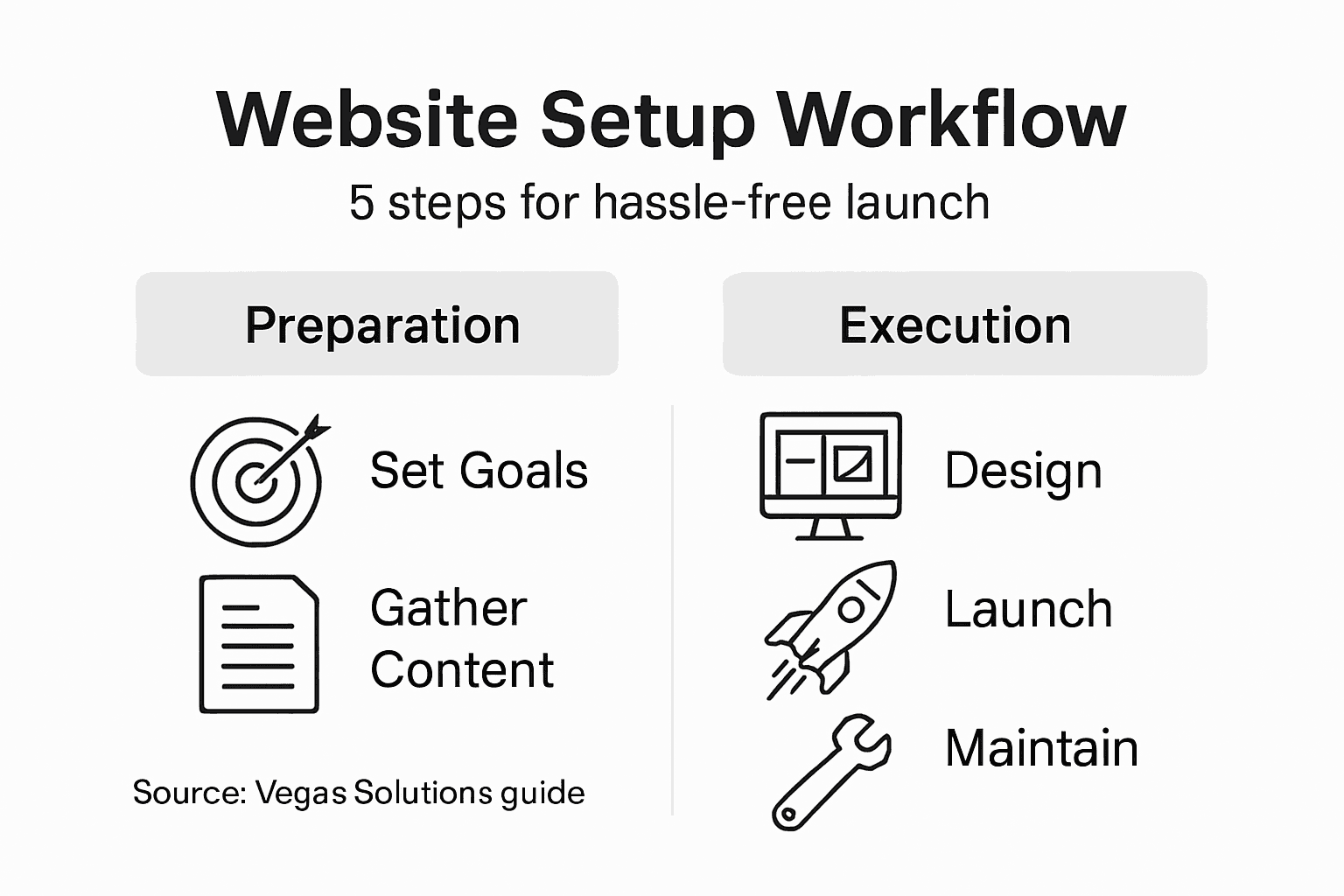
Consider your website a living digital asset that requires consistent attention and strategic improvements. Stay proactive about search engine optimization by periodically reviewing your keywords, updating meta descriptions, and ensuring your content remains aligned with current industry trends. Track user behavior through analytics to understand how visitors interact with your site and make data driven decisions about design, content, and functionality improvements. By treating your website as an ongoing project rather than a one time setup, you will create a dynamic online presence that continues to attract and retain potential customers.
Pro tip: Set calendar reminders for monthly website maintenance and create a simple checklist to ensure you never miss critical update tasks.
Simplify Your Small Business Website Setup Today
The article shows how complex setting up a small business website can be from defining goals to launching and maintaining it without mistakes. If you feel overwhelmed managing everything from hosting choices to design and testing, you are not alone. Common pain points include juggling technical setup, ensuring smooth user experience, and staying on top of ongoing updates while trying to grow your business.
At Vegas Solutions we specialize in handling your entire website workflow for hassle-free setup so you can focus on what matters most. We build host and maintain your website with fast turnaround and clear communication. Our expert team ensures everything works perfectly right from defining your goals through launch and beyond. Start stress-free with our refundable $69 demo and discover how seamless your online presence can be.
Ready to get your website project off the ground without tech headaches Visit Vegas Solutions now to learn how we support small businesses and self-employed professionals every step of the way. Experience one point of contact simple language and ongoing support designed for your success. Take the first step toward a professional website that truly works for you.