

Most small business owners assume their website is either up or down. It is a reassuring binary. But website downtime is actually any period when a site is unavailable or unable to function properly, and that includes slow load times, broken checkout pages, and forms that silently fail to submit. A customer who hits a spinning loading screen or gets an error at payment is experiencing downtime, even if your homepage appears perfectly fine. This guide walks through what downtime really means, why it hits small businesses hard, what causes it, and how you can protect yourself before something goes wrong.
What Website Downtime Really Means
The word "downtime" suggests a complete outage, like a business with its lights off. In reality, the definition is much broader, and that broader definition is exactly where small businesses get caught off guard.
Website downtime covers any period when a site cannot function properly for its users, whether that means the site is completely inaccessible or simply degraded in a way that prevents people from doing what they came to do. A customer who cannot complete a purchase because the checkout page crashes has experienced downtime, even if your homepage loaded just fine.
There are several distinct types of downtime worth knowing:
- Complete outages: The entire site is unreachable. Visitors see an error page or a blank screen.
- Partial failures: One part of the site works while another does not. The homepage may load perfectly, but the booking form, store, or contact page is broken.
- Degraded performance: Pages load eventually, but so slowly that users leave before seeing your content or completing a purchase.
- Functional failures: The server returns a 200 OK status — technically responding — but the content it delivers is wrong, incomplete, or unusable.
- Regional failures: Your site works for visitors in one city but fails for users in another region due to server or network routing issues.
"Partial and functional outages are often the most dangerous for small businesses because they are easy to miss internally while still costing you real customers and real money."
Many small business owners do not catch these subtler problems because they never see them personally. They check the homepage, see it loads, and assume everything is fine. Meanwhile, a broken contact form may have been quietly turning away leads for days.
Why Website Downtime Matters for Your Business
For enterprise companies, the numbers around downtime get attention fast. Gartner famously estimated downtime costs enterprises around $5,600 per minute on average. The equivalent figure for small and medium businesses is lower — around $427 per minute — but that number is proportionally devastating for a business operating on thin margins.
The direct revenue impact is only the beginning. Here is how downtime damages small businesses across multiple dimensions:
- Lost sales: Every minute your checkout or booking page is down, potential buyers go elsewhere. Many never return.
- Customer churn: Studies indicate that 40 to 85 percent of customers may not come back after a bad experience on a website.
- SEO penalties: Search engines like Google factor in site reliability. Frequent or prolonged downtime can push your rankings down, reducing organic traffic over time.
- Operational disruption: Staff who rely on the website for orders, appointment scheduling, or client communication lose productive time during outages.
- Recovery costs: Emergency fixes, developer fees, and the time spent diagnosing and resolving issues often cost more than consistent preventive maintenance would have.
| Cost type | Description | Impact level |
|---|---|---|
| Direct revenue loss | Sales not made during outage | High |
| Customer churn | Visitors who never return | Very high |
| SEO ranking drop | Long-term organic traffic decline | Medium to high |
| Staff disruption | Lost productivity during outage | Medium |
| Recovery and repair | Emergency developer or hosting fees | High |
The "fully loaded cost" of downtime, accounting for reputation, future lost business, and operational drag, is often estimated at three to five times the immediate revenue loss. A one-hour outage during a busy afternoon might feel manageable in the moment but cost you far more over the weeks that follow.

Pro Tip: If your business relies on the website for bookings, inquiries, or sales, think of your site as a storefront. You would not leave your store's front door locked during business hours without knowing about it. Invest in uptime monitoring to stay aware of what your customers experience — not just what you see when you check in.
Main Causes of Website Downtime
Knowing your enemy is the first step to defeating it. Downtime does not usually appear out of nowhere. It has identifiable causes, many of which are preventable with the right practices in place.
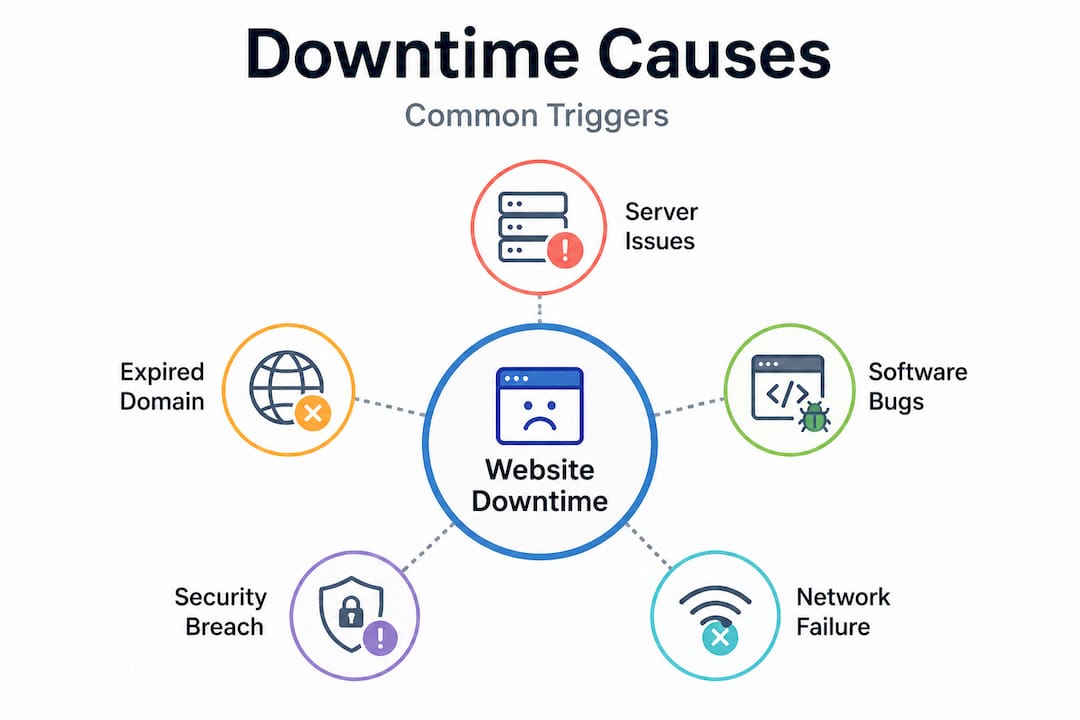
| Cause | Prevention |
|---|---|
| Hosting failures | Choose reliable hosting with SLA guarantees |
| Traffic spikes | Use scalable hosting or a CDN |
| Software and plugin conflicts | Test updates in staging; maintain regularly |
| Expired domain or SSL | Set auto-renewal; use monitoring alerts |
| Cyberattacks (DDoS, malware) | Use firewalls, security plugins, DDoS protection |
| Human error | Use staging environments; implement backup protocols |
| Third-party failures | Vet external services; have fallback options |
| Hardware failure | Use managed cloud hosting with redundancy |
Hosting Failures
Your web host is the foundation your site sits on. Budget hosting providers often oversell server capacity, meaning your site shares resources with hundreds of others. When a neighboring site gets a traffic surge, your site slows or crashes. Reliable hosting with guaranteed uptime SLAs (99.9% or higher) and clear infrastructure redundancy is the baseline protection against this.
Traffic Spikes
A promotion goes viral. A local news outlet links to your site. A seasonal rush hits all at once. If your hosting plan cannot handle sudden demand, your site will buckle under the load. A content delivery network (CDN) distributes your site's content across multiple servers globally, so no single server absorbs the full burden of a traffic spike.
Software and Plugin Conflicts
WordPress and similar platforms rely on a stack of plugins and themes that need to work together. An update to one component can break compatibility with another, causing partial or complete failures. This is one of the most common causes of small business site downtime, and it is almost entirely preventable with regular, careful maintenance and a staging environment where updates are tested before going live.
Expired Domains or SSL Certificates
An expired domain means your site address no longer works. An expired SSL certificate triggers browser security warnings that tell visitors your site is not safe, causing most to leave immediately. Both are entirely avoidable with auto-renewal settings and monitoring alerts that warn you well in advance.
Cyberattacks
DDoS attacks flood your server with traffic until it cannot respond to real visitors. Malware injections corrupt your site's files or redirect visitors to harmful pages. Brute-force login attempts can lock out legitimate access. These threats are ongoing and growing. A web application firewall (WAF), strong login security, and regular malware scanning are the core defenses.
Human Error
A well-meaning edit to a template file. A plugin deletion that removes a critical dependency. A database operation that wipes the wrong table. Human error is an underestimated cause of downtime. A staging environment (a copy of your site where changes can be tested safely) and a reliable backup schedule mean that mistakes are recoverable.
Third-Party Service Failures
Your site may depend on external services: payment processors, booking platforms, live chat widgets, review plugins, or map embeds. When any of these fail, parts of your site may stop functioning even though your own server is fine. Vet external services for reliability and have fallback plans for critical functions.
How Downtime Is Measured
Uptime is typically expressed as a percentage of time a site is available over a period. The numbers sound high until you do the math:
| Uptime percentage | Annual downtime |
|---|---|
| 99% | 87.6 hours |
| 99.9% | 8.7 hours |
| 99.99% | 52.6 minutes |
| 99.999% | 5.3 minutes |
Most budget hosting providers offer 99.9% uptime guarantees. That sounds excellent until you realize it allows for over eight hours of downtime per year — any of which could fall during your busiest season.
Beyond raw uptime percentage, the metrics that actually matter for small businesses are:
- Mean Time to Detect (MTTD): How quickly do you find out something is wrong? Without monitoring, the answer is often "when a customer complains."
- Mean Time to Recover (MTTR): How long does it take to fix the problem once identified? Recovery time depends heavily on having backups ready and knowing who to call.
- Time to First Byte (TTFB): How fast does your server begin responding to a request? High TTFB indicates server-side performance issues that degrade experience even when the site is technically available.
Basic uptime monitoring pings your site at regular intervals (every minute, for example) and alerts you immediately if it doesn't respond. Free tools like UptimeRobot offer this at no cost. Paid tools add transaction monitoring — actually completing test purchases or form submissions — to catch functional failures that a simple ping would miss.
How to Reduce Website Downtime Risk
Prevention is not complicated, but it does require consistent action. Here are the most effective steps a small business can take:
1. Invest in reliable hosting. Choose a provider with a proven uptime track record, transparent SLAs, and infrastructure redundancy. Managed WordPress hosting from providers like WP Engine, Kinsta, or SiteGround typically outperforms budget shared hosting for reliability.
2. Set up uptime monitoring. Free tools like UptimeRobot check your site every five minutes and send immediate alerts if it goes down. Paid tools like Better Uptime or Pingdom add more frequent checks and functional monitoring. There is no reason to be the last to know your site is down.
3. Maintain regular backups. Keep daily backups stored off-site (not just on the same server as your site). When something breaks, a reliable backup means recovery is measured in minutes rather than hours or days.
4. Keep software updated. Outdated plugins, themes, and CMS core files are the leading cause of security vulnerabilities and software conflicts. Regular updates reduce both security risk and the likelihood of plugin-induced failures.
5. Use a staging environment. Never make significant changes directly to your live site. A staging environment lets you test updates, new features, and configuration changes in a safe copy of your site before pushing anything live.
6. Protect against attacks. Install a web application firewall (Cloudflare is free at the basic level), enable two-factor authentication for admin logins, and run regular malware scans. These steps take hours to set up and protect against threats that cause days of downtime.
7. Monitor third-party dependencies. Know which external services your site depends on and check their status pages when issues arise. Replace unreliable third-party tools with more stable alternatives when recurring failures are identified.
8. Have an emergency response plan. Know in advance who handles recovery when something breaks — your hosting provider's support team, a developer on retainer, or a managed service that handles it for you. A clear plan dramatically shortens recovery time.
Why Small Businesses Can't Afford to Ignore Downtime
For large enterprises, downtime is a board-level concern with dedicated teams monitoring every system around the clock. For small businesses, the same risks exist but the resources to manage them are far smaller.
The most common pattern is: nothing is monitored, something breaks, a customer mentions it, the owner spends hours trying to diagnose the problem, and either pays emergency rates for a developer or waits days for hosting support to respond. The outcome is far more expensive — in money, time, and customer trust — than the cost of prevention would have been.
The practical answer for most small businesses is not to build an in-house monitoring and maintenance team. It is to choose a website provider that includes monitoring, maintenance, and support as part of the service.
Keep Your Site Running with Vegas Solutions
At Vegas Solutions, every website we build and manage includes proactive uptime monitoring, regular software maintenance, daily backups, and direct support — so downtime is caught and resolved quickly, often before you even know something was wrong.
For small business owners who need their website to reliably generate leads and sales without becoming a technical burden, that is exactly what managed website services are designed to deliver.
Request a free website demo and see what a professionally maintained small business website looks like in practice.


