

Many small business websites are built to handle today's traffic, not tomorrow's growth. When a product goes viral, a local press mention sends a surge of visitors, or a seasonal campaign lands bigger than expected, sites that aren't built with scalability in mind can crash, slow to a crawl, or lose customers in seconds. The good news is that building a scalable website doesn't require a massive budget or an in-house engineering team. This guide breaks down what scalability actually means, how it works under the hood, and what practical steps you can take to make sure your site grows right along with your business.
What is website scalability and why does it matter?
Scalability is one of those terms that gets thrown around a lot, but it's worth being precise. Website scalability is the ability of a web system to handle increased load while maintaining performance, availability, and cost efficiency. In plain terms, it means your site keeps working well whether you have 50 visitors or 50,000 visitors on any given day.
For small business owners, this matters more than most realize. Your website is often the first impression a potential customer gets. If it loads slowly or goes down during a traffic spike, that customer is gone — and so is the revenue. The stakes are real.
Here's what scalability directly affects for your business:
- Site speed: Slow load times drive visitors away fast. Even a one-second delay can meaningfully reduce conversions.
- Uptime: A site that crashes during your busiest moments is worse than no site at all.
- Cost efficiency: A well-planned scalable setup means you only pay for what you actually use, not for peak capacity all the time.
- User experience: Consistent performance builds trust and encourages return visits.
One common misconception is that scaling just means buying a bigger server. That's a bit like assuming you can solve rush-hour traffic by widening one lane. The real solution involves creating growth-friendly content, choosing the right hosting structure, optimizing your code, and planning for how demand will change over time.
"Scalability isn't just a technical feature. It's a business continuity strategy. When your site can't keep up with demand, you're not just losing clicks — you're losing customers and credibility."
The importance of website speed to conversions and search rankings makes this even more pressing. Search engines like Google factor in page load times when ranking results, so a slow site doesn't just frustrate users — it can quietly bury your business in search results too.
Scalability planning is about anticipating change before it forces your hand.
Core mechanics: How scalable websites actually work
Now that you understand what scalability is, let's look at the practical tools and techniques that make a website scalable.
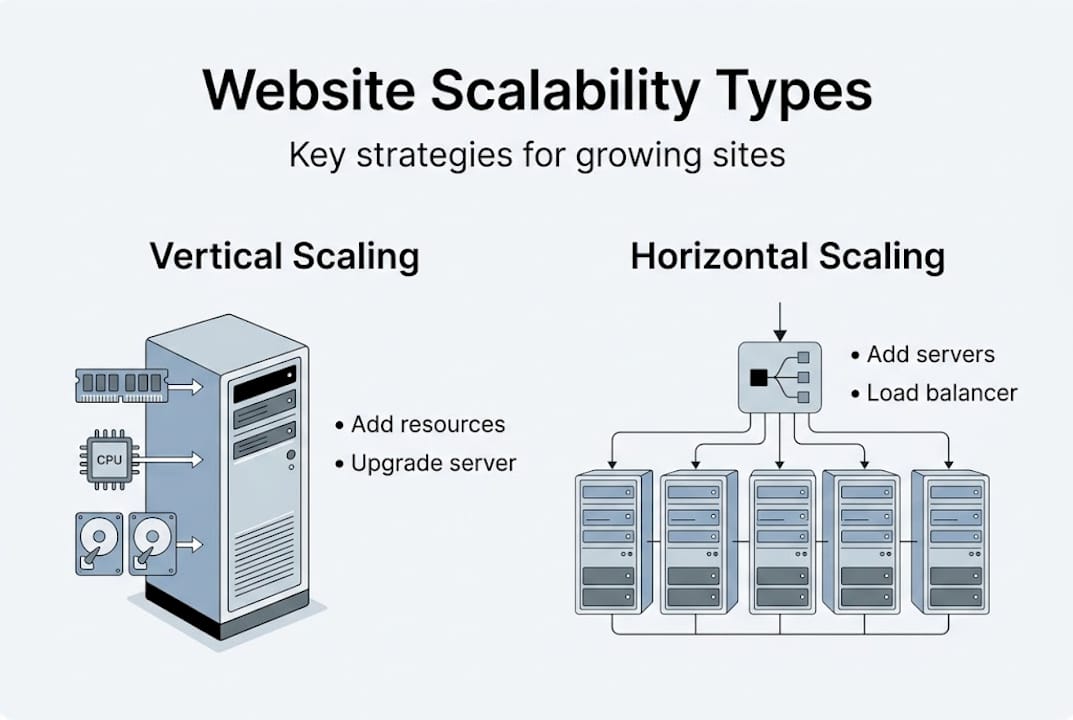
Here's a quick comparison of the two main scaling approaches:
| Approach | How it works | Best for | Limitation |
|---|---|---|---|
| Vertical scaling | Add more CPU/RAM to one server | Simple sites, early growth | Has a ceiling; single point of failure |
| Horizontal scaling | Add more servers to share the load | High-traffic, distributed sites | More complex to set up and manage |
Most small businesses start vertical and move horizontal as they grow. That progression makes sense from both a cost and complexity standpoint.
Here are the core mechanics worth knowing:
- Caching: Tools like Redis and Memcached store frequently requested data in memory so your server doesn't have to rebuild the same pages over and over. This alone can dramatically speed up your site.
- Content Delivery Networks (CDNs): A CDN distributes your site's static assets (images, scripts, stylesheets) across servers around the world. Visitors load content from the server closest to them, cutting latency significantly.
- Autoscaling: This lets your infrastructure automatically add or remove resources based on real-time traffic. Autoscaling and load balancing improve site resilience by distributing incoming requests across multiple servers so no single point gets overwhelmed.
- Stateless application design: When each server request is independent and doesn't rely on stored session data, any server can handle any request. This makes horizontal scaling much easier.
Pro Tip: Before you invest in complex infrastructure, audit your current site's bottlenecks. Often, adding a CDN and enabling caching can cut load times by 40 to 60 percent without major architectural changes. That's a fast win with meaningful impact.
The professional site design impact on user retention is closely tied to these performance factors. A well-designed site built on a scalable foundation keeps visitors engaged longer. Pair that with solid website security practices, and you have a platform that both performs and protects.

Edge cases and common pitfalls in scaling websites
Even with a solid scaling plan, there are hidden traps that can catch small business sites off guard. Understanding them early saves a lot of headaches later.
Some of the most disruptive scaling bottlenecks include the thundering herd problem, head-of-line blocking, cascading failures, database connection exhaustion, and cross-region latency. These aren't just enterprise problems — they can hit a local service business just as hard during a promotion or a local event.
Here's what each of these means in practice:
- Thundering herd: When a cache expires and thousands of requests hit your database all at once, it can bring the whole system down. The fix is staggered cache expiration or a lock mechanism.
- Head-of-line blocking: One slow request holds up everything behind it. This is particularly common with synchronous database queries. Using asynchronous processing helps.
- Cascading failures: One service fails, which causes another to fail, which causes another — like dominoes. Circuit breakers and graceful degradation patterns prevent this chain reaction.
- Database connection exhaustion: Too many simultaneous connections overwhelm the database. Connection pooling solves this by reusing connections instead of opening new ones for every request.
- Cross-region latency: If your server is in one location but your customers are across the country, every request takes longer than it should. A CDN or multi-region deployment addresses this.
For most small business websites, the most common real-world pitfalls are simpler than these technical scenarios. They include:
- Choosing shared hosting that puts you on an overloaded server with dozens of other sites
- Uploading uncompressed images that bloat every page load
- Installing too many plugins or third-party scripts that add weight without adding value
- Not setting up any caching, so every page request rebuilds from scratch
- Ignoring monitoring until the site is already down
Most small business site failures during traffic surges are caused by hosting limitations, unoptimized images, and lack of caching — not complex infrastructure problems. These are fixable without technical expertise.
A professional website built from the start with performance in mind avoids most of these traps before they become problems.
Practical steps for small businesses: How to scale affordably
You don't need to be a software engineer to build a scalable site. Here are practical steps that fit a small business budget and timeline.
Step 1: Audit your current hosting and infrastructure
Start by identifying what you're working with. Log into your hosting dashboard and check:
- What type of hosting you have (shared, VPS, dedicated, cloud)
- How much bandwidth and storage you're using versus your limits
- Whether your plan includes any traffic burst protection
If you're on shared hosting with no room to scale, even small traffic spikes can take your site down.
Step 2: Add a CDN
A CDN is one of the highest-impact, lowest-cost performance upgrades available. Services like Cloudflare offer a free tier that delivers significant improvements for most small business sites. A CDN caches your site's static assets globally, reduces server load, and often includes basic DDoS protection.
Step 3: Enable server-side and browser caching
Caching tells browsers and servers to store a copy of your page so it doesn't have to be rebuilt on every visit. For WordPress sites, plugins like WP Rocket or W3 Total Cache handle this easily. For custom-built sites, your developer can configure caching at the server level.
Step 4: Optimize your images
Images are the single largest contributor to slow load times on most small business sites. Run every image through a compression tool before uploading. Serve images in modern formats like WebP where supported, and use lazy loading so images below the fold don't load until the user scrolls to them.
Step 5: Choose hosting that can grow with you
Cloud hosting platforms like AWS, Google Cloud, DigitalOcean, or Cloudways offer plans that scale automatically with traffic. You don't need to over-provision from day one — you start small and scale up as needed. This is fundamentally different from fixed shared hosting.
Step 6: Monitor continuously
Set up uptime monitoring (tools like UptimeRobot offer free plans) and connect your site to Google Search Console to catch crawl errors and speed issues early. Review your analytics monthly to spot traffic patterns before they become problems.
Step 7: Plan for traffic events
If you're running a promotion, launching a product, or expecting seasonal spikes, proactively contact your host or temporarily upgrade your plan. A few dollars spent on extra capacity during a high-traffic period is far cheaper than the lost revenue from a downed site.
| Priority | Action | Cost | Impact |
|---|---|---|---|
| 1 | Add Cloudflare CDN | Free | High |
| 2 | Enable caching | Free–$10/mo | High |
| 3 | Compress and optimize images | Free | High |
| 4 | Switch to cloud hosting | $10–$50/mo | High |
| 5 | Set up uptime monitoring | Free | Medium |
| 6 | Plan for traffic events | Variable | Medium |
A fresh perspective: Why scalability starts with mindset, not tech
Most guides treat scalability as a purely technical problem. But for small business owners, the biggest barrier isn't usually technology — it's the assumption that scalability is only something big companies need to think about.
The reality is that small businesses are often more vulnerable to traffic disruptions than large ones because they have less redundancy and fewer resources to recover quickly. A small local business whose site crashes during a viral moment loses the exact window of opportunity that took months or years to create.
Building a scalable site is really about one thing: making sure your infrastructure is never the reason a customer doesn't become a customer.
That shift in thinking changes how you approach decisions:
- You choose hosting based on growth potential, not just current price.
- You invest in a CDN before you need it, not after a site outage.
- You ask your website provider whether their platform is built to handle growth.
- You monitor your site's performance proactively instead of waiting for complaints.
For business owners who work with a managed website service like Vegas Solutions, many of these decisions are made for you. The hosting infrastructure, caching configuration, and performance optimization are handled by the team, so you're not managing servers — you're managing your business.
Ready to scale your site? Explore tailored solutions
If your current website feels fragile — or if you simply don't want to think about hosting, caching, and performance optimization — the right move is working with a team that builds scalability in from the start.
At Vegas Solutions, every website we build is optimized for performance, hosted on infrastructure that can handle growth, and maintained by our team so you never have to worry about a traffic spike taking your site offline.
Get a free website demo and see what a professionally built, scalable small business site looks like in practice.