

TL;DR:
- Using a custom domain email signals professionalism and builds client trust.
- Proper setup includes choosing a provider, configuring DNS, and securing authentication records.
- Professional emails serve as trust signals that influence client perceptions before communication begins.
Most small businesses lose client trust before a single conversation happens. The culprit is often something as simple as an email address. Sending proposals or invoices from a Gmail or Yahoo account signals to potential clients that you may not be running a serious operation, even if your work is outstanding. A professional email address, one that uses your own business domain like you@yourbusiness.com, changes that perception immediately. Higher response rates are one of the measurable benefits businesses see after making the switch. This guide covers what professional email is, how it works, how to set it up, and the best practices that keep it running well.
Table of Contents
- What makes an email address 'professional'?
- How professional email works: Domains, hosting, and providers
- The setup process: Steps to launch your professional email
- Critical best practices: Authentication, deliverability, and scaling
- The real reason professional email sets you apart
- Ready to upgrade? Professional email and web solutions for growth
- Frequently asked questions
Key Takeaways
| Point | Details |
|---|---|
| Boosts trust | A professional email address signals legitimacy and competence to clients and partners. |
| Delivers reliably | Authentication steps like SPF, DKIM, and DMARC keep your email out of spam folders. |
| Grows with you | Professional email platforms make it easy to add users and scale as your business expands. |
| Easy setup | Modern providers let you set up a custom-domain email in under an hour with minimal technical skills. |
What makes an email address 'professional'?
A professional email address is one that uses your registered business domain rather than a free, generic provider. Instead of yourname@gmail.com, it looks like yourname@yourbusiness.com. That small difference carries a lot of weight with clients, vendors, and partners who are deciding whether to trust you with their time or money.
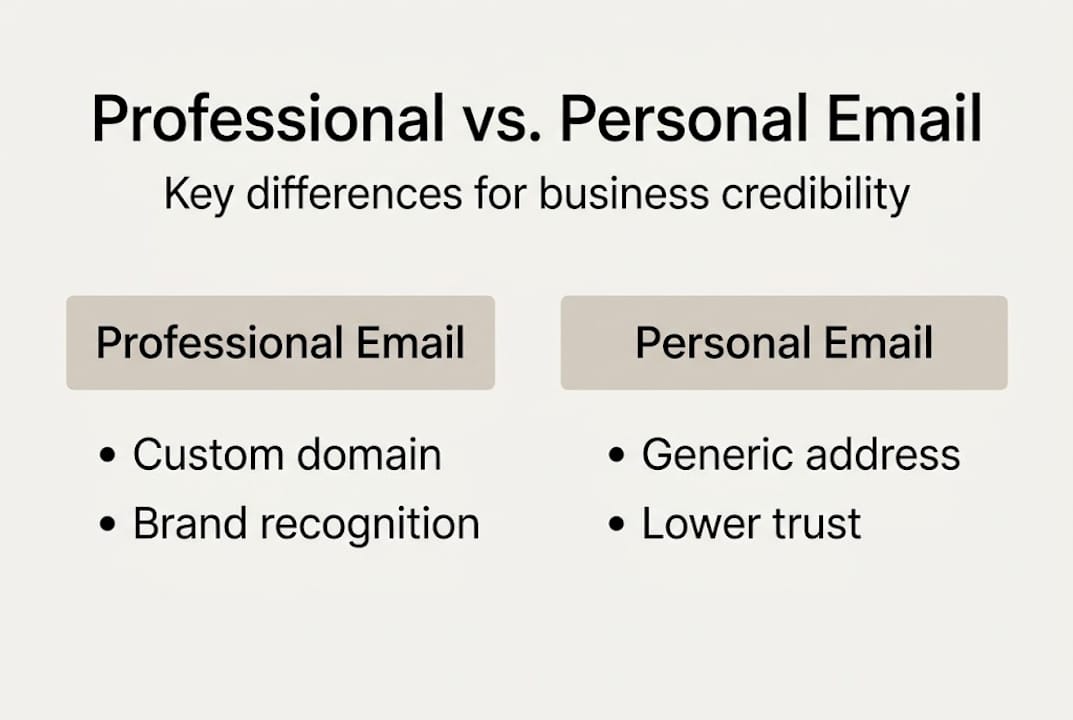
The contrast between professional and personal email is sharper than most people expect. Here is a quick comparison:
| Feature | Professional email | Personal email |
|---|---|---|
| Domain | Your business domain | Generic (Gmail, Yahoo) |
| Brand perception | Strong and credible | Casual or untrustworthy |
| Deliverability | Higher, less spam filtering | Often flagged or filtered |
| Account control | Full admin access | Limited to personal use |
| Team accounts | Yes, multiple users | No shared management |
| Monthly cost | $0 to $10 per user | Free |
Clients and partners respond better to branded addresses because they signal accountability. A business with its own domain has made an investment. That investment, even a small one, communicates that you are serious. Professional email boosts trust in ways that directly support client acquisition, especially for service-based businesses where relationships are everything.
Beyond trust, professional email comes with features that personal accounts simply do not offer:
- Branded domain address tied to your business identity
- Admin controls to manage team accounts, passwords, and permissions
- Security policies including two-factor authentication and data encryption
- Multiple mailboxes for different roles like sales@, support@, or info@
- Integration with calendars, CRM tools, and productivity software
"Businesses using professional email see higher response rates due to better perception and deliverability. For anything trust-dependent, free email is a liability."
This matters even more when you consider that your email address is often the first thing a prospect sees after visiting your website. Pairing a strong email presence with the benefits of professional websites creates a consistent, credible image across every touchpoint. Businesses that invest in website services for credibility understand that every detail of your online presence contributes to how you are perceived.
How professional email works: Domains, hosting, and providers
Understanding the components behind professional email removes the mystery and makes setup much less intimidating. There are three main pieces: your domain name, your email hosting provider, and the configuration that ties them together.
Your domain name is the foundation. It is the address people type to find your website, and it becomes the second half of your email address. If your domain is yourbusiness.com, your email becomes you@yourbusiness.com. Without a domain, there is no professional email. This is why registering a domain that matches your business name is always the first step, as outlined in this business email hosting guide.

Your email hosting provider is the service that stores and delivers your messages. The provider you choose affects storage limits, security features, support quality, and cost. Here is how the major options compare for small businesses:
| Provider | Starting cost | Key features | Ease of use |
|---|---|---|---|
| Google Workspace | ~$6/user/month | Gmail interface, Drive, Meet | Very easy |
| Microsoft 365 | ~$6/user/month | Outlook, Teams, Office apps | Moderate |
| Zoho Mail | Free tier available | Privacy-focused, solid tools | Easy |
According to setup guidance for small businesses, the standard steps to get professional email running are:
- Register a domain that matches your business name
- Choose an email hosting provider that fits your budget and needs
- Connect your domain to the provider by updating DNS settings
- Create individual mailboxes for yourself and any team members
- Test sending and receiving before going live
One important note: free-only setups often come with limitations that hurt growing businesses. Storage caps, limited support, and restricted integrations can slow you down at the worst time. Paid plans from reputable providers are affordable and worth the investment. When choosing website hosting, many businesses find it efficient to bundle email and web hosting under one provider or manager. The impact of site design and email together reinforces your brand, and even simple websites paired with professional email can make a strong impression.
The setup process: Steps to launch your professional email
Setting up professional email is straightforward when you follow the right sequence. Skipping steps or rushing through the process is where most mistakes happen.
Here is the full setup process from start to finish:
- Register your domain. Choose a domain that matches your business name exactly. Avoid hyphens or creative spellings that clients might mistype.
- Select your email provider. Based on your budget and preferred tools, pick from Google Workspace, Microsoft 365, or Zoho Mail.
- Configure MX records. These are DNS settings that tell the internet where to deliver your email. Your provider will give you the exact values to enter.
- Create your mailboxes. Set up addresses for yourself and any team members. Consider role-based addresses like info@ or support@ for shared inboxes.
- Set up authentication. Add SPF, DKIM, and DMARC records to your domain to prevent spoofing and improve deliverability (more on this in the next section).
- Test everything. Send and receive test emails, confirm mobile sync works, and check that your email signature displays correctly.
This full setup process for business email is well-documented, and most providers offer step-by-step wizards to guide you through the technical parts. The complete setup mechanics include registering the domain, choosing a provider, configuring MX records, and testing before launch.
Common mistakes to avoid:
- Using a domain that does not match your business name
- Skipping email verification steps after setup
- Continuing to use a personal email alongside your new business one
- Forgetting to set up an email signature with your name, title, and contact info
Pro Tip: Always match your email domain to your exact business name. If your website is yourbusiness.com, your email should be @yourbusiness.com, not a variation or abbreviation. Consistency builds recognition.
After setup, sync your email to your phone, connect your calendar, and configure your signature. These small steps make a big difference in day-to-day professionalism.
Critical best practices: Authentication, deliverability, and scaling
Getting your email set up is only half the job. Keeping it trusted, secure, and effective over time requires a few technical but manageable practices.
Email authentication is the process of proving to receiving mail servers that your messages are legitimate. The three main methods are SPF, DKIM, and DMARC. Think of them as a verification system that tells Gmail, Outlook, and other providers that your email is really coming from you.
- SPF (Sender Policy Framework): A DNS record that lists which servers are allowed to send email from your domain
- DKIM (DomainKeys Identified Mail): A digital signature attached to each email that verifies it has not been tampered with
- DMARC (Domain-based Message Authentication, Reporting, and Conformance): A policy that tells receiving servers what to do if SPF or DKIM checks fail
Email authentication is now essential for deliverability and is required by Google and Yahoo for bulk senders sending more than 5,000 emails per day. Even if you are not sending in bulk, setting these up protects your domain reputation and keeps your messages out of spam folders.
Domain warmup is another step that many new business owners skip. When you start sending from a brand new domain, inbox warmup requires gradually increasing your sending volume over 14 to 60 days. Jumping straight to high volumes triggers spam filters, which can damage your domain reputation before you have even built it.
Pro Tip: Monitor your domain reputation using free tools like Google Postmaster Tools. Rotate your DKIM keys every 6 to 12 months as a standard security practice.
As your business grows, scaling your email setup is simple. Add mailboxes for new team members, create subdomains for specific campaigns, and review your authentication records whenever you change providers. Professional web hosting and email management often go hand in hand, and businesses focused on SEO for service businesses know that domain reputation affects more than just email.
The real reason professional email sets you apart
Here is something most articles on this topic miss: professional email is not just a technical checkbox. It is a trust signal that works before you say a single word.
When a prospect receives a reply from info@yourbusiness.com versus yourname123@gmail.com, the decision about whether to trust you has already started. It is not always conscious, but it is real. Free email addresses trigger a quiet suspicion, especially in competitive markets where clients have options. Your services might be world-class, but a generic email address introduces doubt at exactly the wrong moment.
A branded email address acts as an instant credibility marker. It tells the recipient that you have invested in your business, that you are organized, and that you take communication seriously. Paired with the benefits of professional websites, it creates a complete first impression that is hard to argue with.
The uncomfortable truth is that in competitive markets, trust is won or lost before a contract is ever signed. Often, it happens with your very first reply. Treating your email address as a minor detail is a mistake that costs real business.
Ready to upgrade? Professional email and web solutions for growth
Your email address and your website work together to shape how clients see your business. If one is polished and the other is not, the gap shows. Getting both right does not have to be complicated or expensive.
At Vegas Solutions, we build, host, and maintain websites for small businesses and self-employed professionals so you only deal with one point of contact. If you want to see how your business could look online, request a custom demo for $69, credited toward the build and refundable until you approve it. Check out our affordable monthly pricing to see what fits your budget, or explore our Dothan AL website design services if you are in the area. We handle everything so you can focus on running your business.
Frequently asked questions
What are the main benefits of a professional email address?
Professional email increases trust, improves deliverability, strengthens your brand image, and makes it easier to manage communication across a team. It is one of the fastest ways to signal credibility to new clients.
How much does it cost to set up professional email for a small business?
Google Workspace starts at about $6 per user per month, Microsoft 365 is similarly priced, and Zoho Mail offers a free tier for basic use. Most small businesses pay between $0 and $10 per user per month.
Is a custom domain required for a professional email?
Yes. A professional email uses your business domain rather than a generic provider like Gmail or Yahoo. Without a custom domain, the email address cannot be considered truly professional.
What is email authentication and why does my business need it?
SPF, DKIM, and DMARC are authentication methods that prevent email spoofing and ensure your messages reach inboxes. They are required by Gmail and Yahoo for bulk senders and strongly recommended for all business email accounts.
How long does it take to set up a new business email?
Initial setup takes under an hour for most providers, but domain warmup for high-volume sending can take 2 to 8 weeks. For everyday business communication, you can start using your new address the same day you set it up.


