

Understanding the risk: why small business websites are vulnerable
Small business websites represent attractive targets for cybercriminals in 2026. Many owners assume their size makes them invisible to attackers, but the opposite is true. Hackers specifically target smaller operations because they often lack dedicated IT staff and sophisticated security infrastructure.
The statistics paint a sobering picture. Only 14% of small businesses have adequate defenses to protect against modern threats. This gap leaves countless websites exposed to attacks that could have been prevented with basic security measures. The consequences extend far beyond temporary downtime or embarrassment.
Financial devastation follows most breaches. Small and mid-sized businesses face costs between $120,000 and $200,000 per incident, covering forensic analysis, legal fees, customer notifications, and remediation efforts. These expenses often exceed what small operations can absorb. Perhaps most alarming, roughly 60% of small businesses close within six months of experiencing a major breach.
Common vulnerabilities create easy entry points for attackers:
- Outdated content management systems and plugins containing known security flaws
- Weak or reused passwords across multiple administrator accounts
- Missing security headers that browsers use to block malicious content
- Lack of HTTPS encryption exposing customer data during transmission
- Infrequent backups leaving no recovery option after ransomware attacks
These weaknesses persist because many small business owners don’t realize their website needs active security management. They treat their site like a static brochure rather than a dynamic system requiring ongoing maintenance. Understanding website security for small businesses is the first step toward protection.
“The question isn’t whether your small business will face a cyber threat, but when. Preparation determines whether you survive the attack or become another statistic.”
Recognizing these risks motivates proper security preparation. The good news is that implementing basic protections dramatically reduces your vulnerability without requiring a computer science degree or massive budget.
Preparation: essential tools and prerequisites for securing your website
Before implementing security measures, you need to understand your website’s technical foundation and gather necessary tools. This preparation phase prevents costly mistakes and ensures smooth execution of security protocols.
Start by documenting your website’s components. Identify your content management system (WordPress, Wix, Squarespace, or custom build), hosting provider, active plugins or extensions, and current backup systems. Understanding website terms small business owners should know helps you communicate effectively with technical support and make informed decisions.
Key security concepts you need to grasp:
- HTTPS/SSL: Encrypts data traveling between your website and visitors, protecting sensitive information from interception
- Content Security Policy (CSP): Tells browsers which content sources to trust, blocking malicious scripts
- HTTP Strict Transport Security (HSTS): Forces browsers to use encrypted connections only
- Multi-Factor Authentication (MFA): Requires two verification steps before granting account access
- Firewall: Filters incoming traffic to block known attack patterns
Research shows that implementing security headers like CSP and HSTS significantly reduces breach risk. These technical controls work silently in the background, providing continuous protection without affecting user experience.
| Tool Category | Purpose | Typical Cost |
|---|---|---|
| SSL Certificate | Enables HTTPS encryption | $0 to $200 annually |
| Security Plugin | Adds firewall and monitoring | $0 to $300 annually |
| Backup Solution | Automated data protection | $50 to $500 annually |
| Password Manager | Generates and stores strong passwords | $0 to $60 annually |
| Security Scanner | Identifies vulnerabilities | $0 to $200 monthly |
Regularly updating website software is crucial for patching vulnerabilities that attackers exploit. Software vendors release updates specifically to fix security flaws discovered after initial release. Delaying these updates leaves known weaknesses exposed.

Gather access credentials for your hosting account, domain registrar, CMS admin panel, and any third-party services integrated with your website. You’ll need these to implement security changes. Store credentials securely using a password manager rather than spreadsheets or sticky notes.
Pro Tip: Create a simple spreadsheet listing every plugin, theme, and service connected to your website, along with current version numbers and last update dates. This inventory becomes invaluable when troubleshooting issues or planning security updates.
Evaluate your hosting provider’s security features. Quality hosts include automatic backups, malware scanning, and DDoS protection in their plans. If your current provider lacks these basics, consider migrating to a more security-focused option. Preparation also means setting realistic expectations about time investment. Initial security setup requires several hours, but ongoing maintenance needs only 30 to 60 minutes monthly once systems are in place.
Execution: practical steps to secure your small business website
With preparation complete, you can now implement security measures systematically. Follow these steps in order to build layered protection for your website.
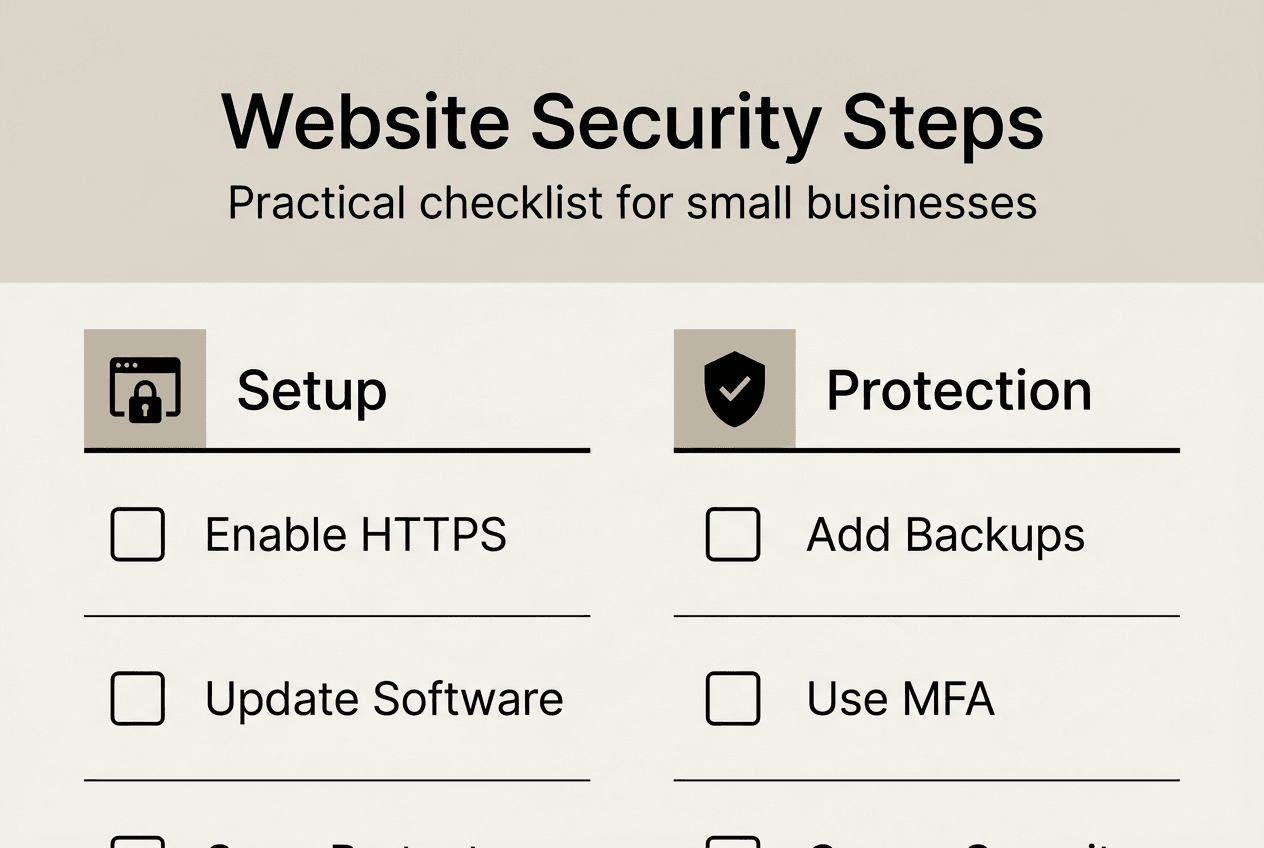
Step 1: Install and enforce HTTPS with a valid SSL certificate
Contact your hosting provider to enable SSL/TLS encryption. Most hosts offer free certificates through Let’s Encrypt or include SSL in hosting plans. Once installed, configure your website to redirect all HTTP traffic to HTTPS automatically. Enforcing HTTPS protects data in transit and improves search engine rankings as a bonus.
Verify proper installation by visiting your website and checking for a padlock icon in the browser address bar. Click the padlock to confirm certificate validity and encryption status.
Step 2: Enable security headers
Security headers provide instructions to web browsers about how to handle your website’s content. Add these headers through your hosting control panel or via plugin:
- Content Security Policy (CSP) to prevent cross-site scripting attacks
- HTTP Strict Transport Security (HSTS) to enforce encrypted connections
- X-Frame-Options to prevent clickjacking attacks
- X-Content-Type-Options to stop MIME type sniffing
Most security plugins configure these headers automatically. If managing manually, consult your hosting provider’s documentation for specific implementation instructions.
Step 3: Update all software components
Log into your CMS admin panel and check for available updates. Install updates for:
- Core CMS software (WordPress, Joomla, Drupal, etc.)
- All active plugins and extensions
- Website themes and templates
- Server software (if you have access)
Enable automatic updates for minor security patches when possible. Schedule monthly manual checks for major version updates that may require testing before deployment.
Step 4: Implement strong password policies and multi-factor authentication
Strong passwords and MFA enhance security significantly by making unauthorized access extremely difficult. Replace all weak passwords with unique, complex alternatives:
- Minimum 16 characters combining letters, numbers, and symbols
- No dictionary words or personal information
- Different password for every account and service
- Generated and stored using a password manager
Enable multi-factor authentication on your CMS, hosting account, domain registrar, and email. MFA requires entering a time-based code from your phone after entering your password, blocking attackers even if they steal credentials.
| Security Measure | Protection Level | Implementation Difficulty |
|---|---|---|
| HTTPS Only | High | Easy |
| Security Headers | High | Medium |
| Regular Updates | Critical | Easy |
| Strong Passwords | High | Easy |
| Multi-Factor Authentication | Critical | Easy |
| Automated Backups | Critical | Medium |
| Firewall/Security Plugin | Medium | Easy |
Step 5: Configure automated backups with offsite storage
Set up daily automated backups that capture your complete website including files, databases, and configurations. Store backups in a separate location from your web server, preferably with a dedicated backup service or cloud storage provider.
Test backup restoration quarterly by recovering your website to a staging environment. Untested backups are worthless during actual emergencies. Document the restoration process so anyone on your team can execute recovery if needed.
Step 6: Choose secure hosting and consider managed support
Your hosting provider forms the foundation of website security. Evaluate whether your current host offers adequate protection or if migration makes sense. Look for providers offering built-in firewalls, malware scanning, DDoS mitigation, and expert support.
Understanding how to choose website hosting for your business helps you select providers aligned with security priorities. Managed hosting services handle technical security tasks, letting you focus on business operations.
The role of website support becomes crucial when security incidents occur. Having experts available to respond immediately can mean the difference between minor disruption and catastrophic data loss.
Step 7: Install security monitoring and response tools
Implement monitoring systems that alert you to suspicious activity. Security plugins typically include:
- Login attempt monitoring and blocking after failed attempts
- File integrity monitoring detecting unauthorized changes
- Malware scanning identifying infected files
- Traffic analysis flagging unusual access patterns
Configure alerts to notify you immediately via email or text when potential threats are detected. Quick response limits damage from successful attacks.
Pro Tip: Schedule security tasks during low-traffic periods to minimize disruption if something goes wrong. Early morning or late evening updates reduce the impact of unexpected downtime on customers.
Understanding the benefits of regular website updates motivates consistent maintenance. Security improvements accompany most updates, providing ongoing protection against emerging threats.
Verification and maintenance: monitoring and responding to website security threats
Implementing security measures is just the beginning. Ongoing verification and maintenance ensure your protections remain effective as threats evolve and your website changes.
Schedule monthly security audits reviewing all protective measures. Create a checklist covering:
- Software version verification for CMS, plugins, and themes
- SSL certificate expiration dates and renewal status
- Security header configuration and effectiveness
- Backup completion status and storage integrity
- User account review removing inactive administrators
- Password age and strength across all accounts
Use automated security scanning tools to identify vulnerabilities you might miss manually. Many services offer free basic scans detecting common issues like outdated software, missing security headers, or exposed sensitive files.
Test your backup and recovery process quarterly, not just when disaster strikes. Restore a backup to a staging environment and verify all functionality works correctly. Time how long restoration takes and document any challenges encountered. This practice ensures you can recover quickly during actual emergencies.
Monitor website logs and security alerts daily for suspicious patterns:
- Multiple failed login attempts from the same IP address
- Unusual traffic spikes or geographic access patterns
- Unexpected file modifications or new files appearing
- Database query errors suggesting injection attempts
- Increased bandwidth usage indicating possible data theft
Develop an incident response plan before you need it. Document specific steps to take when detecting potential breaches:
- Immediately change all passwords and revoke suspicious user access
- Take the website offline if actively under attack to prevent further damage
- Contact your hosting provider and security service for expert assistance
- Preserve logs and evidence for forensic analysis
- Notify affected customers if personal data was potentially compromised
- Restore from clean backups after identifying and removing threats
Regular backups and disaster recovery plans are essential for business continuity. Without tested recovery procedures, even perfect backups may fail when you need them most.
Educate everyone with website access about current security threats. Phishing emails targeting administrators remain the most common attack vector. Train staff to recognize suspicious messages, verify requests through separate communication channels, and never share credentials via email or phone.
Stay informed about emerging threats affecting your CMS and plugins. Subscribe to security bulletins from software vendors and industry organizations. When critical vulnerabilities are announced, patch immediately rather than waiting for your regular update schedule.
The importance of regular website reviews extends beyond security to overall business performance. Quarterly comprehensive reviews catch security issues alongside usability problems and outdated content.
Maintain detailed records of all security activities including update dates, configuration changes, and incident responses. This documentation helps identify patterns, satisfy compliance requirements, and train new team members on your security protocols.
Security is not a one-time project but an ongoing commitment. Threats evolve constantly, requiring continuous adaptation of your defenses. However, the time investment decreases significantly after initial setup. Most small businesses maintain adequate security with just 30 to 60 minutes of focused attention monthly.
Secure your website with expert support from Vegas Solutions
Implementing these security measures protects your website, but maintaining them consistently requires ongoing attention and technical expertise. Vegas Solutions specializes in comprehensive website security and management for small businesses throughout Alabama.
We handle everything: monthly software updates, automated backups, security monitoring, and immediate incident response. You get peace of mind knowing experts actively protect your online presence while you focus on growing your business. Our transparent pricing includes all security essentials without surprise fees.
Our custom website design services in Montgomery and Dothan build security into your site from day one. We create beautiful, functional websites with enterprise-level protection tailored to small business budgets. One point of contact handles design, hosting, security, and ongoing support, simplifying your technology management.


